Installing Microsoft Edit in Debian or Ubuntu based distros
Microsoft Edit provides terminal editing with full mouse and copy-paste support.
???+ note
The current version of Edit (1.2.0) is not available via the package manager apt yet. This could change at some point in the future, making for an easier deployment.
Install pre-requisites
Section titled “Install pre-requisites”Install zstd, needed to decompress the downloaded archive:
sudo apt install zstdInstall the latest Edit version from GitHub for x86_64
Section titled “Install the latest Edit version from GitHub for x86_64”Download and install the latest release: EDIT_VERSION=$(curl -s “https://api.github.com/repos/microsoft/edit/releases/latest” | grep -Po ‘“tag_name”: “v\K[0-9.]+’) wget -qO edit.tar.zst https://github.com/microsoft/edit/releases/latest/download/edit-$EDIT_VERSION-x86_64-linux-gnu.tar.zst sudo tar xf edit.tar.zst -C /usr/local/bin edit edit –version rm -rf edit.tar.zst
The commands above can be turned into a script for repeat installs.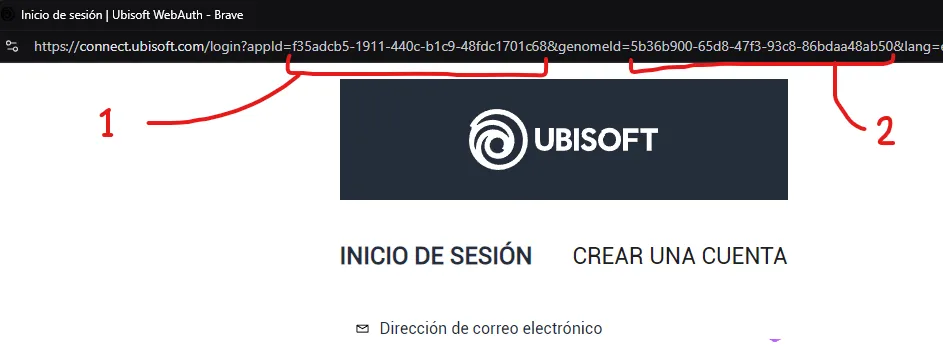 /// caption
Image showing the necessary values to copy from the login URL
///
/// caption
Image showing the necessary values to copy from the login URL
/// /// caption
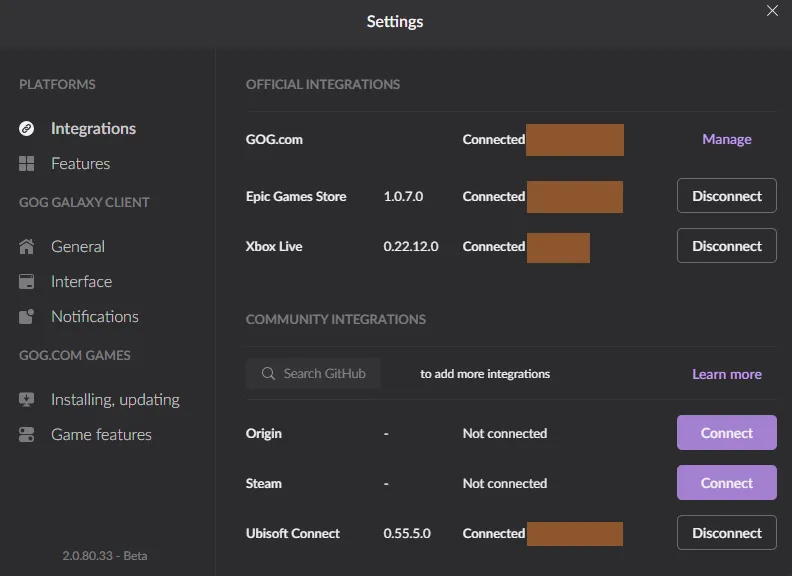
Image showing a working connection to Ubisoft Connect after a successful file modification
///
/// caption
Image showing a working connection to Ubisoft Connect after a successful file modification
///