Fixing the GOG Galaxy 2.0 Ubisoft Connect plugin connection
The issue
Section titled “The issue”Upon connecting the GOG Galaxy client to Ubisoft Connect, it goes into a disconnected state again. This happens just seconds after signing in to the Ubisoft Connect account using the plugin’s login.
How to fix the issue
Section titled “How to fix the issue”???+ note This seems to be an open issue in the GitHub repo referenced below. A definitive solution has not been found as this method needs to be re-applied from time to time.
A solution shared on a Reddit post applies here:
Not able to connect my ubisoft connect with GoG galaxy
byu/ved7108 ingog
And this is also shared in this GitHub issue:
https://github.com/FriendsOfGalaxy/galaxy-integration-uplay/issues/33#issuecomment-1444362239
The basics are here for reference:
- Click on the “Connect” button in the Ubisoft Connect integration settings on GOG Galaxy
- Upon getting the screen, copy the (1)
appIdand (2)genomeIdvalues from the pop-up URL
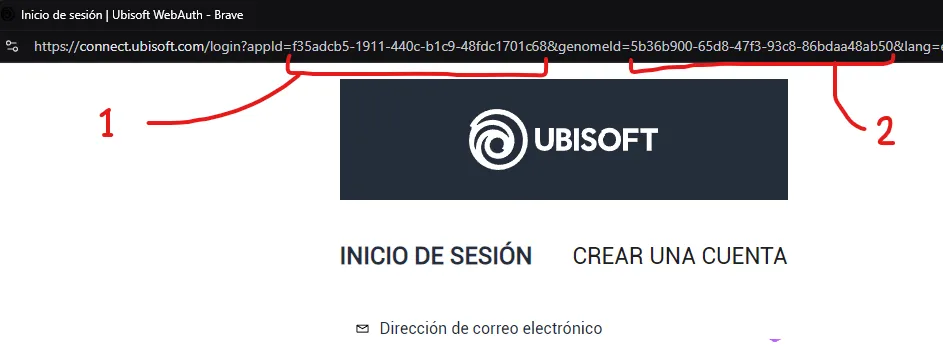 /// caption
Image showing the necessary values to copy from the login URL
///
/// caption
Image showing the necessary values to copy from the login URL
///
- Modify the file
%localappdata%\GOG.com\Galaxy\plugins\installed\uplay_afb5a69c-b2ee-4d58-b916-f4cd75d4999a\consts.py- If using VSCode, you can just execute in a powershell shell this command
code %localappdata%\GOG.com\Galaxy\plugins\installed\uplay_afb5a69c-b2ee-4d58-b916-f4cd75d4999a\consts.py- Find the lines shown below and replace the values with the ones you got from the Ubisoft Connect login screen
CLUB_APPID = "f35adcb5-1911-440c-b1c9-48fdc1701c68"CLUB_GENOME_ID = "5b36b900-65d8-47f3-93c8-86bdaa48ab50"- Save the file and log in on the Ubisoft Connect login screen
- The client should now stay connected, as shown below
!!! info inline end “Remember” Remember that this fix, so far, needs to be re-applied if Ubisoft changes the values on their side
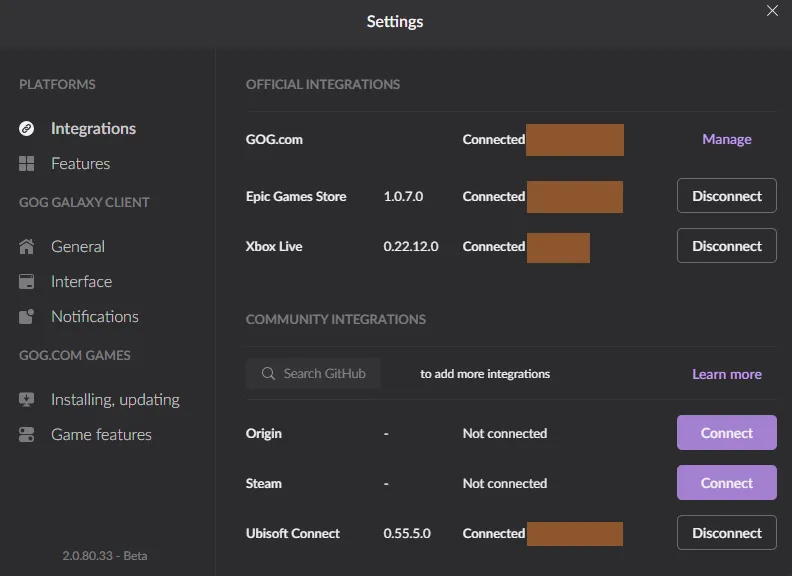 /// caption
Image showing a working connection to Ubisoft Connect after a successful file modification
///
/// caption
Image showing a working connection to Ubisoft Connect after a successful file modification
///